





Beta 0.8.3
Your games and mods,
one click away.
The TGP Launcher app installs projects in the right place (GTA V, FiveM, RedM, Minecraft…), keeps them up to date, launches TyNox Games Production games and gathers all your Steam, Epic Games, GOG, Ubisoft, EA, Battle.net and Rockstar games.
Windows 10 (64 bits) · 3,8 Mo · SHA-256 7e7de0fe049b434d…
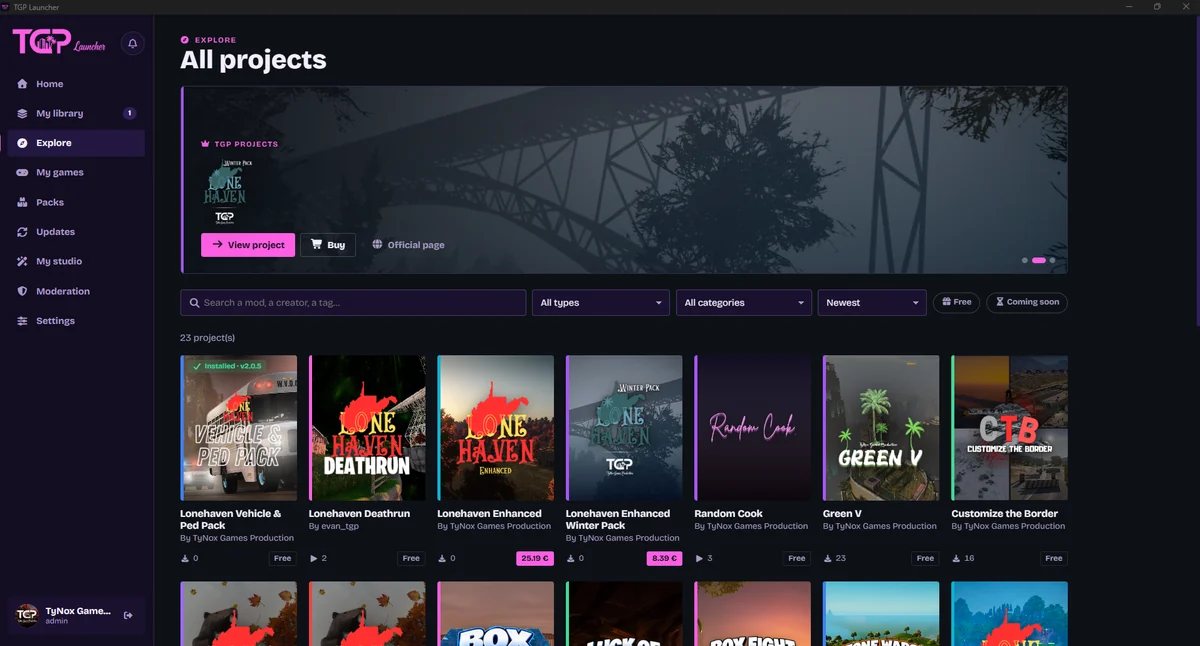
For players
Instalación en un clic
The project is downloaded, verified, then installed in the right place. Prefer doing it yourself? Pick manual install: the archive waits in Downloads.
The right file for your game
A creation comes in FiveM and single-player versions? The app detects your games (GTA V Legacy or Enhanced, FiveM, RDR2…) and suggests the right file.
Actualizaciones automáticas
New versions detected with their notes, betas for testers, and a rollback offered if a creator pulls a version.
TyNox Games Production games
Studio games install, launch with “Play” and update from the app, with your play time.
All your games together
“My games” lists your Steam, Epic Games, GOG, Ubisoft, EA, Battle.net and Rockstar games, without signing in to your accounts, with a “Mods” button for each.
Packs
Community mod selections to install in one go, and your own packs to share with a link.
Vanilla mode
Turn off all your GTA V / FiveM mods in one click to play online, then bring them back. Each mod can also be disabled without uninstalling.
Follow your creators
Profiles, follows and Windows notifications: you know right away when a creator publishes or updates a project.
Archivos verificados
SHA-256 checked, antivirus scan, projects reviewed by moderators and terms of use always shown before installing.
For creators and servers
Your studio in the app
Create and edit your projects, publish versions (stable, beta or scheduled) and manage your team without opening the site.
Stats and feedback
Downloads, plays, live players on your Fortnite island or server, and bugs sent by players with their setup.
Upload to your server
An installed FiveM / RedM resource goes to your hosted server over FTP or FTPS, with “ensure” added to server.cfg.
How it works
Proyectos publicados
26
Descargas
810
Plays
514
- Install the app
A first-run assistant sets the language, finds your games and asks what you are into.
- Iniciar sesión
With your TyNox Interactive account: your library, follows and packs come along.
- Pick and accept
The file that matches your game, automatic or manual install, and the terms of use.
- Jugar
Updates arrive on their own. A problem? Report it to the creator from the app.